

Digital Product Passport software for fashion
Create a Digital Product Passport customers can actually use.
Start with one Shopify product. Wetrack organises the information you already have, shows what is missing and helps you publish a reviewed, branded passport customers can open from a QR code.
Five published passports on the Free plan, with unlimited product imports. No credit card. No expiry.
Try a real passport
Scan the code. See the passport on your phone.
This is a live Wetrack passport, not a mockup. Scan the QR code with your phone and explore the same page a customer would see from a product label. No app to install and no account to create.
The code is also a link, so on a phone you can tap it instead of scanning.

 Tap the code
What goes inside
One clear page for the product behind the label.
Bring the information scattered across your store, documents and supplier records into one product page customers can understand. Show only the information you are ready to publish and improve it as better data arrives.
Materials and composition
Show what the product is made from, including material percentages, recycled content and origin information when you have it.
Where it was made
Add countries, suppliers and production facilities to explain where the product and its main components came from.
Claims and evidence
Keep certificates and supporting documents connected to the claims they support, while keeping self-declared information clearly distinct.
Care and repair
Give customers washing, care and repair guidance that can stay with the product long after the original store page changes.
Environmental information
Add environmental information when the necessary product data is available, including an Ecobalyse product footprint on supported plans.
See how the footprint is calculated about Environmental informationOne permanent product link
Update the information behind the passport without replacing the QR code already printed on the garment, packaging or label.
Your first passport
From Shopify product to published passport, one step at a time.
You do not need a complete supplier map or a finished compliance project before you begin. Start with one product, see what you already know and improve the record as new information arrives.

Choose a product from Shopify
Connect your store and Wetrack brings in the product information already there, including images, descriptions, variants and SKUs.
Add what lives elsewhere
Bring in composition, supplier information, production details, care guidance, certificates and other product documents you already have.
Let Wetrack prepare the record
The AI assistant helps sort reusable information, suggests where it belongs and highlights what is still missing.
Review and publish
Check every suggestion, approve the information you trust and choose what customers can see. Then publish the passport and its QR code.
How the AI helps
The AI prepares the record. You approve the information.
Wetrack finds, sorts and matches product information so you spend less time copying fields by hand. It does not invent missing facts and nothing is published until you approve it. Think of it as a careful assistant, not an autopilot.
Built for Shopify
Keep the store you already have. Wetrack works alongside it.
Wetrack connects to your Shopify catalogue without taking over your store. Product information is imported into a separate workspace where you can prepare the passport before anything becomes public.
- Import products and variants without rebuilding your catalogue
- Reuse materials, suppliers and evidence across multiple products
- Keep passport work private until you choose to publish
Installing Wetrack does not edit your Shopify products, theme or SEO.

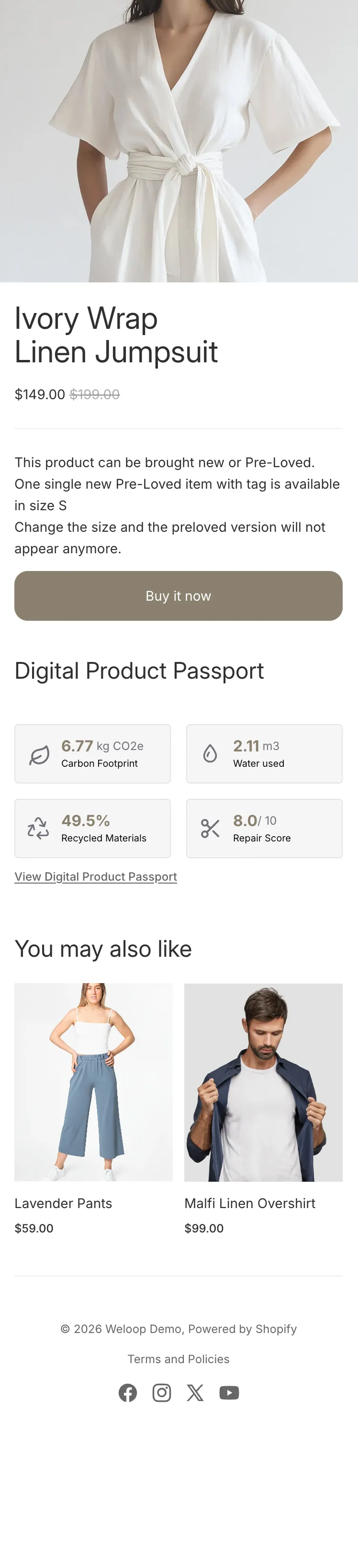

Before and after purchase
The passport stays useful after the product leaves your store.
Before purchase, selected product information can help customers understand materials, origin and claims. After purchase, the same passport can remain available for care, repair and end-of-life guidance. The optional Shopify widget brings selected passport information onto the product page while the QR code keeps the full record attached to the physical product.
Illustrative product using the live Wetrack sample.
What is known today
The EU framework exists. The final textile-specific passport rules do not.
Textiles are a priority product group under the EU Ecodesign for Sustainable Products Regulation, but the delegated act setting the final textile requirements is still to come. That means nobody can promise that a passport created today is finally compliant with requirements that have not yet been adopted. What brands can do now is organise the product data, supplier information and evidence that take time to collect, then update the same record as the rules become clearer.
Straight answers
Questions about creating a fashion product passport
Still have a question? Ask us directly
What do I need for a useful first passport?
Start with the product information you already trust: materials, care, manufacturing information and the claims you want to explain. Missing information can stay empty while you work through it. You do not need a complete supplier map before you begin.
Will AI create or publish information for me?
No. The AI helps find, organise and match information to the right fields and products. You review every suggestion, correct what is wrong and decide what appears on the public passport.
Can I publish a passport if some information is missing?
Yes. A passport does not need to pretend that every field is complete. Publish the information you trust and add more as suppliers, certificates and better evidence become available.
Can I publish without certificates?
Yes. Materials, origin, care and other factual product information do not depend on having certifications. When a claim does rely on supporting evidence, Wetrack keeps that evidence connected to it.
Can I change the passport after printing the QR code?
Yes. The QR code keeps pointing to the same passport, so the information behind it can be improved without printing a new code.
Can I start with one collection instead of the full catalogue?
Yes. In fact, starting with one representative product is often the easiest way to learn the workflow. Materials, suppliers and evidence can then be reused across the rest of the collection.
Does Wetrack change my Shopify store?
No. Wetrack imports catalogue information into its own workspace and does not edit your Shopify products, theme or SEO. Any storefront element appears only when you choose to enable it.
Start with one product
Your first passport does not need to be a transformation project.
Import your catalogue and publish up to five passports on the Free plan. Or preview one product from its public page before creating an account.
No credit card. No expiry. Improve the passport as your information improves.